
What is RCS and why do you need it
RCS or Rich Communication Service messages allow marketers to send messages containing text, images, videos, as well as buttons with links, while at the same time leveraging the RCS specific functionality.
RCS messages require a data connection and need to be activated on the recipient's device.
To enable the sending of RCS messages, you must configure RCS endpoints within the Admin Configuration module. These endpoints serve as the connection points required when setting up and dispatching RCS messages.
Key Configuration Considerations:
-
Message Type-Specific Endpoints: RCS messaging requires different endpoints depending on the message classification:
-
Conversational/Transactional messages require one type of endpoint.
-
Promotional messages require a separate, distinct endpoint.
-
-
Country-Specific Requirements: Endpoints must be provisioned on a per-country basis. Each country you intend to target must have its own dedicated set of endpoints for the relevant message types.
Example:If you plan to send both conversational and promotional RCS messages across five countries, you will need to configure 10 unique RCS endpoints—two per country (one for each message type).
Setting up the RCS endpoint to allow using the RCS channel in your messages
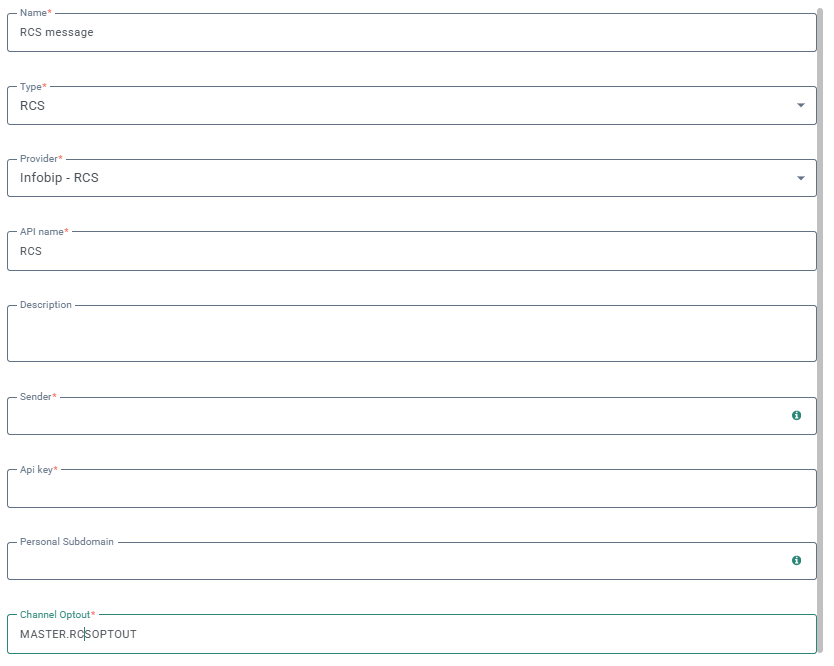
The following fields can be configured:
- Name* — Provide a name that reflects the use of this RCS endpoint. This name will be used in the Business unit configuration.
- Type* — Select the type of endpoint here: RCS.
- Provider* — You must choose the linked RCS plugin
to use for this endpoint. Depending
on the selected RCS plugin, different connection
parameters are required.
Note: The type and provider fields can only be selected during creation of a new channel endpoint. When editing an existing channel endpoint, they are read-only and can no longer be changed.
At this point, the Infobip plugin is supported for legacy RCS messages. Infobip is a third party provider used for the sending of these RCS messages.
The MCS (Message channel service) RCS plugin is the Selligent native platform service for sending messages and is used for all new RCS messages.
Once the Provider has been selected, a different set of fields need to be set depending on the provider:
Using Infobip as the RCS provider:
- API-Name* — The API-name attributed to the endpoint and used by the API.
- Description — Provide a description that reflects the use of this endpoint.
- Channel Opt-out* — Select the numeric field, in the main Audience List or extended profile, that should be used to indicate if the contact is opted out for this channel. If for a contact record, this field contains a value that is different from null or zero, this means an opt out for this channel endpoint and the contact will not be targeted by RCS messages based on this endpoint. The value in the OPT-OUT field in the main Audience List is not taken into account in this case.
Note: When there are multiple RCS endpoints, they can all use the same opt-out field; or each can have their own. This means that a contact might be opted out for certain RCS messages, but not for all.
The following fields are linked to your subscription at the provider:
- Sender* — This is the Sender ID. It can be numeric (e.g. 74567 or +1-555-987-6543) or alphanumeric (e.g. CompanyName).
- API key* — The API key required to connect to the Infobip API service.
- Personal subdomain — This is your personal subdomain at the provider (eg. http://YOUR_NAME. infobip.com). It is sufficient to enter only YOUR_NAME here, not the entire domain name.
Using the native MCS plugin as RCS provider
- Description — Provide a clear description that reflects the use of this endpoint. (Example: RCS endpoint for brand X)
- Source — Source identifier for MCS. This value is set on the MCS platform for each tenant and can be entered freely. If unsure what this value is, contact your Zeta representative. (example: slg:eu)
- Sender ID — Id of the sender for outbound messages. This corresponds to the FROM of the message. It can be numeric (e.g. 74567 or +1-555-987-6543) or alphanumeric (e.g. CompanyName).
- MCS Account ID — The ID of the application created in the tenant on the MCS platform and that needs to be used for sending these messages. It lets you identify which application should be used as there can be more than one within the same tenant.
- Endpoint override — The URL of an alternative MCS environment. Use this when you want to reach a different MCS environment instead of the default one.
- Channel Opt-out* — Select the numeric field, in the main Audience List or extended profile, that should be used to indicate if the contact is opted out for this channel. If for a contact record, this field contains a value that is different from null or zero, this means an opt out for this channel endpoint and the contact will not be targeted by RCS messages based on this endpoint. The value in the OPT-OUT field in the main Audience List is not taken into account in this case.
Note: When there are multiple RCS endpoints, they can all use the same opt-out field; or each can have their own. This means that a contact might be opted out for certain RCS messages, but not for all.